
Faceless channels don’t fail because they are faceless; they fail because they are soulless.
To survive in the current YouTube ecosystem, your script needs to mimic human curiosity and excitement. If the AI is reading a script that wouldn’t hold your attention if a friend said it to you in a coffee shop, it definitely won’t hold a viewer’s attention on their screen.
Do you feel that your current scripting process is leaning too heavily on information-dumping, or are you struggling more with the initial “hooking” of the audience?
Here is a breakdown of why these three specific factors—boring intros, robotic pacing, and a lack of storytelling—act as “retention killers” for automation channels.
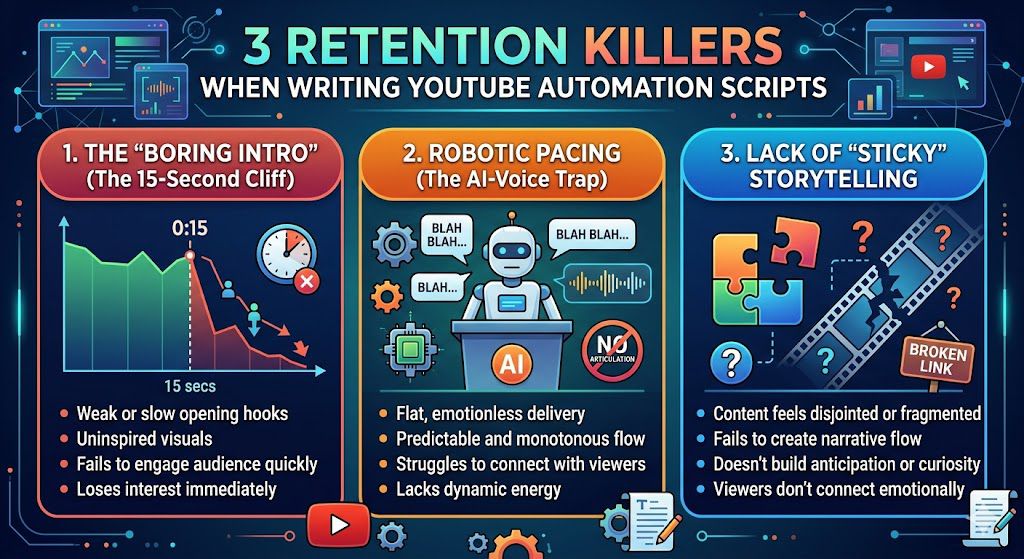
The “Boring Intro
In YouTube automation, many creators make the mistake of treating the intro like a formal essay—starting with a generic “Welcome back to the channel, today we are going to talk about…”
The viewer’s attention span is razor-thin. If you don’t validate their reason for clicking within the first 5–10 seconds, they will leave.
Instead of a greeting, start with a shocking statistic, a polarizing statement, or a visual representation of the problem the viewer is trying to solve. You have to prove you can deliver the solution immediately.
Robotic Pacing
Because many faceless channels rely on AI text-to-speech tools, they often fall into a “monotone” trap where the script reads exactly like a textbook.
The brain naturally tunes out sounds that lack variance in pitch, speed, and emotion. If the script isn’t written with prosody (the rhythm and intonation of speech) in mind, even a high-quality AI voice will sound grating or hypnotic in a bad way.
Write for the ear, not the eye. Use short, punchy sentences. Add “verbal signposts” (e.g., “But here is where it gets interesting…” or “Wait, don’t miss this part”). Use punctuation to force pacing—ellipses (…) and line breaks are your best friends for controlling how the AI pauses.
Lack of “Sticky” Storytelling
Many automation scripts are just collections of facts. If a viewer wants facts, they can go to Wikipedia. If they stay on YouTube, they want a journey.
Without a narrative arc, there is no “why” for the viewer to keep watching. Information without context is just noise.
A sticky script introduces a question early on and only provides the final piece of the puzzle at the very end.
The Setup: Establish a goal (e.g., “How to save $1,000”).
The Obstacle: Highlight why it’s hard (e.g., “Most people fail because of this one mistake…”).
The Transformation: Show how the viewer changes or achieves the goal once they have the information you provide.
What a well structure script should include.
A well-structured script is essentially the “blueprint” for the viewer’s journey. Because YouTube’s algorithm is fundamentally a satisfaction engine, it prioritizes videos that keep users on the platform. Your script is the tool that controls that duration. Here is how a high-retention script acts as a “secret weapon” to trigger the algorithm and keep viewers locked in.
It Solves the “First 30 Seconds” Crisis
The YouTube algorithm treats the first 30 seconds as the most critical “quality check.” If a high percentage of viewers drop off here, the algorithm assumes the video is misleading or boring and stops pushing it.
structured script eliminates the “filler” (intro music, “Hey guys, welcome back,” or slow personal backstories). Instead, it jumps directly into the Hook, fulfilling the promise made by the thumbnail and title within seconds.
When retention remains high during this window, YouTube interprets this as a “high-quality match” for the search query or interest, earning your video more impressions.
It Manages “Cognitive Load” via Pacing
Viewers naturally lose focus if the content is too predictable or slow. A professional script builds in Pattern Interrupts—planned shifts in energy, camera angles, or on-screen visuals every 60–90 seconds.
By scripting these moments, you avoid “monotone lulls.” You effectively tell the viewer’s brain, “Don’t look away yet, something new is happening.”
Constant engagement patterns tell the algorithm that your content is “binge-worthy,” which improves your placement in “Suggested Videos.”
It Creates “Curiosity Loops”
The strongest scripts don’t just dump information; they open loops. An open loop is a psychological tension created when you ask a question or hint at a high-value reveal, but delay the answer until later in the video.
By saying, “And in a moment, I’ll show you the exact template I used to fix this,” you create a “must-watch” incentive. The viewer stays for the reward of the information.
This forces a higher “Average View Duration” (AVD). YouTube’s ranking system favors videos where the AVD is closer to 100% of the video length, rather than videos that get thousands of clicks but only a few seconds of watch time.
It Aligns “Expectation” with “Reality”
When a script is structured, the “Value Delivery” section directly pays off the hook. This prevents “viewer regret”—when someone clicks because they are interested, but leaves because the content felt disorganized.
A structured script maps out the content so that every minute provides a clear, digestible takeaway. This satisfies the viewer’s intent.
YouTube tracks viewer satisfaction (through likes, comments, and post-view behavior). If your script delivers exactly what the user expected, the resulting high engagement scores tell the algorithm: “Recommend this to more people who are interested in this topic.”

Keyword and search intent research.
To ensure your YouTube automation scripts resonate with what audiences are actively looking for, you must move beyond guesswork and align your content with Search Intent.
In the context of YouTube automation, where you don’t have a personal brand to fall back on, the script is the value. If it doesn’t match the viewer’s intent, they will click off within the first 30 seconds.
1. Categorize the Search Intent
Before you type a single word, categorize your video topic into one of these four intent buckets. Your script’s tone and structure should shift based on this category:
Informational (The “How-to” or “What is” intent): Viewers want a clear, concise answer.
Script approach: Start immediately with the answer. Use bullet points or step-by-step instructions. Avoid long-winded backstories.
Navigational (The “Best” or “Top 10” intent): Viewers are looking for a recommendation or a comparison.
Script approach: Structure as a review or a listicle. Focus on “Pros vs. Cons” or “The Winner.”
Transactional (The “Buy” or “Price” intent): Viewers are ready to take action.
Script approach: Focus on urgency, benefits, and strong CTAs. Build trust quickly by highlighting proof or social validation.
Commercial/Curiosity (The “Entertainment” intent): Common in viral channels (e.g., celebrity news, mystery, or true crime).
Script approach: Focus on storytelling, tension, and cliffhangers. The “Why” is more important than the “What.”
2. Research-to-Script Workflow
Follow this process to ensure your script is built on data, not just intuition:
Step A: The “Autocomplete” Diagnostic
Type your main keyword into the YouTube search bar and look at the suggestions.
The Action: These suggestions represent the exact language your audience uses. Include these long-tail keywords in your introduction and throughout your script naturally.
Targeting the audience avatar
To refine the “Targeting the Audience Avatar” section of your blog post, you need to move beyond simple demographics. For YouTube automation, the “Avatar” isn’t just a person—it’s a set of expectations regarding pace, intensity, and utility.
In faceless channels, the audience is looking for an experience. By defining your Avatar, you determine the “voice” of your script before you write the first word.
1. The “Problem-Solver” Avatar (Educational/How-To)
Who they are: People searching for specific solutions, DIY tutorials, or software guides.
The Tone: Credible, concise, and calm. Avoid fluff.
Script Strategy: Start with the exact problem, provide the step-by-step solution immediately, and end with a summary of the result.
Key Phrase Structure: “In this video, I will show you exactly how to [solve problem] in [timeframe].”
2. The “Curious Explorer” Avatar (Documentary/History/Science)
Who they are: People looking to be entertained while learning something “cool” or mind-blowing.
The Tone: Dramatic, authoritative, and storytelling-driven. Think “Voice of God” narration.
Script Strategy: Build suspense. Use high-stakes questions and narrative pacing that keeps them on the edge of their seat.
Key Phrase Structure: “What if I told you that [X] wasn’t what it seemed? The truth about [Y] is shocking…”
3. The “Hype-Seeker” Avatar (Celebrity News/Gaming/Trends)
Who they are: People looking for fast-paced entertainment, drama, or the latest viral news.
The Tone: Energetic, urgent, and slightly sensationalist.
Script Strategy: Prioritize “pattern interrupts.” Use quick-hitting sentences and emphasize the most controversial or exciting parts of the story early.
Key Phrase Structure: “Everything has changed. You won’t believe what happened in the last 24 hours regarding [X]…”
Outlining for structure in YouTube automation script writing

This section is critical because it addresses the number one cause of “creator’s block” and disjointed, low-retention videos. When you dive straight into writing a script, you often lose sight of the video’s pacing and logical flow.
Here is a breakdown of why the Outlining Phase is the secret weapon for professional YouTube automation channels.
1. Eliminating “Writer’s Drift”
Without an outline, scripts tend to meander. You might find yourself spending 40% of the video on a secondary point that doesn’t actually serve the main promise of your title.
The Outline Fix: By setting your main “Key Points” first, you create guardrails. If a paragraph doesn’t directly support one of your bullet points, it gets cut before it ever makes it to the final script. This keeps your video focused and your audience’s attention high.
2. Ensuring Optimal Pacing
High-retention videos rely on rhythm. An outline allows you to see the “skeleton” of the video to ensure that value is distributed evenly.
Visualizing the Flow: You can look at your bullets and ask: “Is the transition from point A to point B logical?” or “Am I hitting the audience with a ‘re-hook’ every two minutes?” It is significantly faster to move a bullet point around in an outline than it is to rewrite three pages of dialogue.
3. The “Content Gap” Detection
Automation channels often struggle with repetitive content. An outline allows you to look at your research side-by-side with your planned structure.
Spotting the Fluff: If you have an outline with five points, but your research only supports three of them with high-quality data, you immediately see the gaps. This allows you to hunt for more research before you’ve wasted time writing filler sentences that the algorithm will eventually punish.
4. Efficiency workflow for terms
If you are managing a channel with a team (e.g., a scriptwriter, a voiceover artist, and an editor), the outline serves as the contract.
Approval Gate: You can review the outline with your writer or client to ensure the direction is correct. Once approved, the writing process becomes a simple “fill-in-the-blanks” exercise, which prevents costly revisions and misaligned expectations.
A great script uses “open loops”—mentions of information that will be revealed later—to keep people watching.
5. Strategizing the “Open Loops”
A great script uses “open loops”—mentions of information that will be revealed later—to keep people watching.
Strategic Placement: An outline is the best place to plan these. You can physically map out where to tease the next segment to ensure you aren’t giving away the best parts of the video too early.

The story telling arc in YouTube automation script writing
To turn dry data or news into a compelling narrative for your YouTube Automation channels, you must stop reporting facts and start reporting implications.
In competitive niches like celebrity drama or tech, the audience isn’t looking for an encyclopedia; they are looking for a story that makes them feel something—excitement, shock, or vindication.
1. The “Why Should I Care?” Filter (The Setup)
Never start with the data itself. Start with the impact the data has on the viewer.
Dry: “Company X released a new processor today with 20% faster speeds.”
Narrative: “Is your current computer holding you back from success? Company X just dropped a bombshell announcement that might force every other tech giant to panic.”
The Strategy: Frame the news as an event that changes the status quo.
2. The Conflict (The “Us vs. Them” Dynamic)
Every good story needs a villain, an underdog, or a challenge. Data is boring; conflict is engaging.
In Celebrity Drama: Don’t just report who broke up. Frame it as the “public fallout” vs. “private reality.” Focus on the tension between the two parties.
In Tech: Don’t just list specs. Frame it as the “legacy giant” (the company) vs. the “disruptive newcomer.” The narrative isn’t about the chip; it’s about who is winning the war.
3. The “Stakes” (The Emotional Payoff)
Why does the viewer need to finish the video? You must raise the stakes so the viewer feels they lose something if they click away.
The “So What” Technique: For every fact you present, add a “so what” sentence.
Fact: “The stock dropped 5%.”
So What: “This massive drop signals that investors are losing faith, meaning your own investments in this sector could be in serious danger.”
4. The Humanization of Data
Use analogies to make complex information digestible. This is the secret to keeping retention high in “faceless” channels.
Use Relatable Comparisons: Instead of saying “The battery lasts for 20 hours,” say “It’s like being able to watch every movie in the Lord of the Rings trilogy twice on a single charge.”
Keep it Personal: Even without a face, use conversational language. Instead of saying “It has been reported that,” say “You’ve probably seen the rumors flying around about…”
Pattern Interrupts & Visual Cues:
To make your YouTube automation scripts truly “visual,” you need to stop writing like a novelist and start writing like a filmmaker. If you leave your editor guessing, the video will feel stale.
Here is how to effectively bake Pattern Interrupts and Visual Cues directly into your script to ensure your retention graph remains flat instead of tanking.
1. The “Two-Column” Script Format
The biggest mistake in automation is writing a block of text. Instead, use a table format. This forces you to think about what the viewer is seeing at the exact moment they hear a specific line.
2. Categorizing Your Visual Cues
To keep the pace at 5–10 seconds, categorize your cues so you don’t just repeat the same type of B-roll. Use this “Variety Mix”:
The “Motion” Cue: Use for dry information.
Direction: [Hard cut to stock footage of a bustling city / drone shot / whiteboard animation]
The “Meme/Pop-Culture” Cue: Use for emotional connection or humor.
Direction: [Insert 2-second clip from The Office / viral TikTok trend]
The “Text/Graphic” Cue: Use to highlight key data points so the viewer can read while they listen.
Direction: [Pop-up text: “200% Growth in 24 hours”]
The “POV/First-Person” Cue: Use when describing a scenario.
Direction: [Shift to POV screen recording or a fake text conversation graphic]
3. Scripting the “Pattern Interrupt”
A pattern interrupt isn’t just a random clip; it is a jolt to the viewer’s brain that resets their attention span.
The Audio-Visual Mismatch: When the script says something serious, use a ridiculous or high-energy visual. This creates “cognitive dissonance” that keeps the viewer locked in.
The “Stop Motion” Technique: If you are explaining a complex process, use a sudden, jarring transition or a sound effect (like a “Whoosh” or “Record Scratch”) to signal a shift in the topic.
The “Rehook” Indicator: Write a specific visual note in the script for mid-roll.
Example: [VISUAL CUE: Screen turns red / “Wait, look at this” text overlay]
4. Practical Rule: “The 5-Second Shift”
If your script allows a single piece of B-roll to stay on screen for more than 7 seconds without a text overlay, a zoom, or a shift, you are losing viewers.
Pro-Tip for Scripts:
Mark your script with [V] indicators. If you find yourself writing a paragraph longer than 4 lines without a [V] tag, you must either:
Break the paragraph into shorter, punchier sentences.
Add a directive for a “Visual Shift” (e.g., zoom in, text highlight, or side-by-side comparison).
5. Why This Works for Automation
Faceless channels rely on perceived value. If the screen is static, the brain thinks the content is “slow” or “boring.” By scripting the edit:
You reduce the workload on your editor (they don’t have to guess).
You ensure the “energy” of the video remains high.
You create a “rhythmic” viewing experience that feels like a professional documentary rather than a slideshow.
Would you like me to write a short sample script (30 seconds) demonstrating how to format these specific visual cues within the dialogue?
Injecting Personality (Without a Face):
To move away from the “robotic” AI-generated feel, you have to treat your script less like an encyclopedia entry and more like a conversation with a friend who has a strong opinion.
Here is a breakdown of how to inject a distinct voice into your automation scripts to maximize engagement.
1. Master the “Pattern Interrupt”
Robotic scripts are monotonous. You break the pattern by injecting short, punchy, or slightly unexpected sentences.
The “So What?” Check: After every fact, ask yourself: “Why should they care?” If the script just states a fact, follow it with a witty reaction.
Robotic: “The new smartphone has a 5000mAh battery.”
Distinct Voice: “It packs a 5000mAh battery. Which is basically science-speak for ‘you can doom-scroll all night and still have juice left for your morning alarm.'”
2. Embrace the “Narrative Sarcasm”
Sarcasm is a powerful tool for building rapport because it shows you aren’t just reading a teleprompter—you’re a thinking human (or at least, a very smart persona). Use it to highlight absurdity in your niche.
The Contrast Technique: Pair a high-level fact with a cynical or humorous reality.
Instead of: “Many people try to get rich quickly.”
Try: “And of course, we’ve all seen the ‘get rich quick’ gurus who promise you a Ferrari by Tuesday. Spoiler alert: they’re usually leasing those cars by the hour.”
3. Use “Conversational Fillers” (Deliberately)
Scripts written by AI are often grammatically perfect, which is exactly why they sound boring. Human speech is messy. Sprinkle in natural conversational markers that bridge ideas.
Examples:
“But here’s the kicker…”
“Wait, it gets better—or worse, depending on how you look at it.”
“I mean, honestly, who actually thinks that’s a good idea?”
“Let’s call a spade a spade…”
4. Create a Consistent “Persona”
If your channel is “Faceless,” the script needs a “Personality.” Define it before you write:
The Skeptic: Always questioning the news or trend.
The Enthusiast: High energy, loves the subject, uses lots of exclamation points (metaphorically).
The “Straight-Talker”: No fluff, very dry, deadpan humor, quick wit.
How to implement: If you choose “The Skeptic,” start your script with: “Everyone is telling you that [Topic] is the future. I’m here to tell you why they’re probably wrong.”
5. The “Visual-Script Marriage”
In YouTube automation, your voice is heavily dictated by what is on screen. If you are writing a script, always write the visual cue in brackets right next to the line.
Script Snippet:
Narrator: “So, the company promised us a revolutionary new design.”
[Visual: Cut to a slow-motion shot of the product looking exactly like the old version]
Narrator: “Revolutionary. Right. Because changing the color from ‘Space Gray’ to ‘Moonlight Silver’ is definitely an industrial design breakthrough.”
The power of rehook
A “rehook” is a strategic transition used to reset the viewer’s interest level, essentially promising a new piece of information before the previous one has fully exhausted their curiosity.
Even if your content is high-value, the human brain naturally experiences “attention dips.” A rehook acts as a pattern interrupt in the narrative. Instead of letting a viewer think, “Okay, I’ve heard enough,” a rehook pushes them to think, “Wait, I need to know what happens next.”
1. The “Open-Loop” Link
Don’t just end a segment and jump to the next. Use the end of your current point to tease the upcoming one.
Example: “Now that you understand why the engine failed, you might be thinking it’s unfixable. But in a moment, I’m going to show you the one hack that mechanics usually keep secret to fix this for under fifty dollars.”
2. The “Counter-Intuitive” Pivot
If you’ve just explained a standard fact, follow it up with a contradictory or surprising angle.
Example: “That’s the standard way everyone tells you to invest. But if you look at the historical data, this approach actually loses money 60% of the time. Here is the strategy the top 1% use instead.”
3. The “Stake” Injection
Remind the viewer what is at risk if they stop watching now.
Example: “This seems simple enough, but most people skip step three. If you miss that, you’ll likely lose your progress—I’ll break down exactly how to avoid that trap in thirty seconds.”
4. The data drop tease
Use curiosity-inducing stats to bridge two sections.
Example: “It’s easy to dismiss this as luck. But when you see the actual correlation between these three variables, the results are impossible to ignore. Let’s look at the numbers.”
Why Scripts Are Your Most Important Asset
To wrap up, it is crucial to internalize one fundamental truth: Your script is not just a collection of words; it is the architectural blueprint of your entire video.
In YouTube automation, you are effectively competing for the world’s most finite resource: human attention. Without the personality of a creator on screen to carry the momentum, your script must do the heavy lifting. It is the backbone that holds the entire production together—if the script is weak, the editing will feel disjointed, the pacing will lag, and the algorithm will eventually stop recommending your content.
Why Your Script is the Foundation:It Dictates Retention:
- It Dictates Retention: Every second the viewer spends watching is a direct result of the curiosity you built in the script. If your hook and rehooks fail, no amount of high-end editing can save the video.
- It Streamlines Production: A well-structured script saves hours in the editing suite. When your script includes visual cues and pacing notes, your editor isn’t guessing what goes where—they are executing a plan that is already optimized for engagement.
- It Drives Algorithm Signals: YouTube’s algorithm prioritizes watch time and session duration. A script designed to deliver consistent value keeps viewers locked in longer, signaling to the platform that your video is worth pushing to a wider audience.
- It Scalability: When you have a repeatable, proven script framework, you can delegate the writing process to team members while maintaining a consistent “voice” and quality standard, allowing your channel to scale without you needing to do every task yourself.
- It Scalability: When you have a repeatable, proven script framework, you can delegate the writing process to team members while maintaining a consistent “voice” and quality standard, allowing your channel to scale without you needing to do every task yourself.
Ultimately, automation is about systems. By treating your scriptwriting as a precise, repeatable system rather than an afterthought, you move from “guessing” what might work to engineering content that is built for growth.
Remember: You aren’t just writing to inform; you are writing to keep the viewer from clicking away.
Is there a specific part of the scriptwriting process—such as crafting the hook or structuring the CTA—that you find most challenging to maintain consistently?